• Home
    • All Features
  • Solutions
    • Enterprises
    • Freelancers & Startups
    • Creative Agencies
    • API Solutions
  • Use Cases
    • Video & Animation
    • Web & Interactive
    • Publishers
  • Role
    • Marketing Teams
    • Creative & Design Teams
    • Project Managers
    • Editorial Teams
  • Pricing
  • Resources
    • Desktop Uploader
    • Integrations
    • Knowledge Base
    • Latest Updates
    • Video Tutorials
Login

Getting Started

  • Signing Up
  • How do I contact the support team?
  • Are there any instructional videos that can be used to train oneself?
  • What is QuickReviewer?

Homescreen

  • How do I create and manage my team?
  • Manage Account
  • What are Starred files?
  • I accidentally deleted a file, can I get it back?
  • What is ‘Shared with me’?
  • Is there any option to sort uploaded files?

Image Proofing

  • What image formats does QuickReviewer support?
  • Can I upload PSD and AI files?
  • Can I upload animated GIFs?
  • Is there enough space to post comments on a small image?

Integrations

  • Dropbox Integration
  • Adobe CC
  • YouTube
  • Box Integration
  • Zapier Integration

PDF Proofing

  • Can I zoom into the page size while viewing the PDF file?
  • Can I download a file with all the comments?
  • How do I sort comments in a multi-page PDF file?
  • Is it possible to view stacked versions of PDF files?
  • Do other document types work just like PDF?
  • What file formats does QuickReviewer support?
  • What annotation options are there in PDF files?

Proofing Window

  • Can I compare the version and mark annotations?
  • Can I delete a comment?
  • Can I download a file with all the comments?
  • Version Comparison
  • Is it necessary for everyone to register in order to view or comment on a file?
  • There are too many comments, how can I find a specific comment?
  • I want to reply on the given review or comment. Is it possible?

Upload & Share

  • How to Create and Manage Workspaces
  • Uploading files
  • Sharing folders
  • Sharing Files
  • Setting Expiry and Reminders
  • Is it necessary for everyone to register in order to view or comment on a file?
  • What is the maximum size of a file that can be uploaded to QuickReviewer?
  • What are the options when sharing a file on QuickReviewer?
  • How do I share multiple files?
  • Uploading revisions
  • What file formats does QuickReviewer support?
  • File upload is taking really long

Video Proofing

  • How can I add comments to video file?
  • Can I adjust the video speed?
  • Is there any zoom option available while reviewing video files?
  • How do I sort comments in a video?
  • Can I download a file with all the comments?
  • What file formats does QuickReviewer support?

Website and HTML Proofing

  • How do I add comments to an HTML file?
  • Is it possible to see the HTML preview in a responsive mobile view?
  • If the same file has comments on different view modes (mobile and desktop), will I be able to view all the comments together?
  • How to add an html file for review?
  • How can I review live websites?
  • How can I review online content using link-based proofing?
View Categories
  • Home
  • QuickReviewer Knowledgebase | Help Guides & Troubleshooting
  • Upload & Share
  • What are the options when sharing a file on QuickReviewer?

What are the options when sharing a file on QuickReviewer?

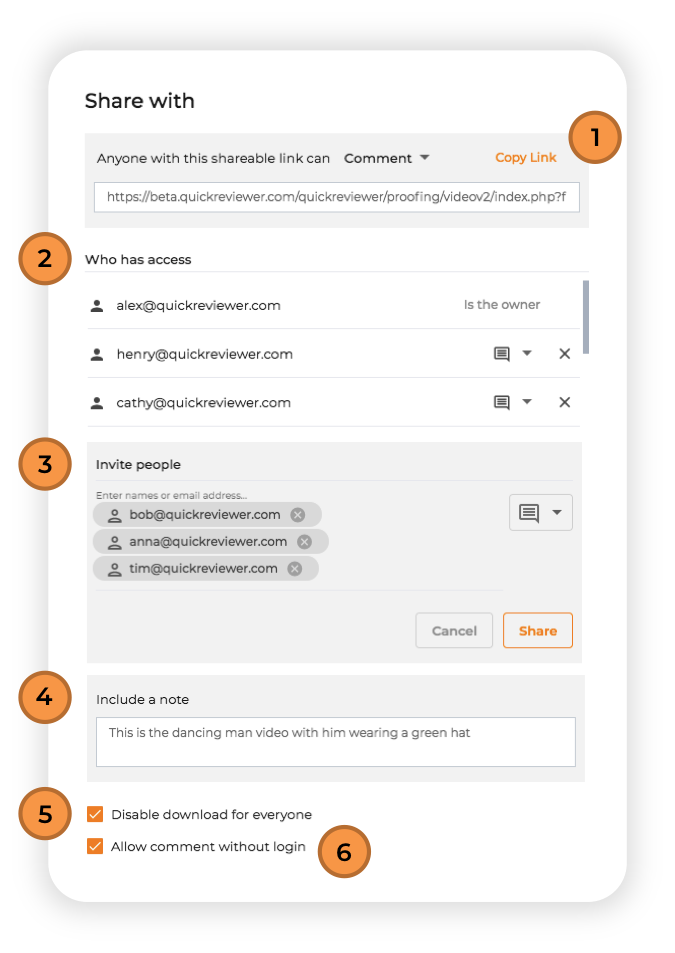
When you share a file, the Share With window gives you a number of options.

QuickReviewer sharing options interface displaying various collaboration and permission settings for file reviews

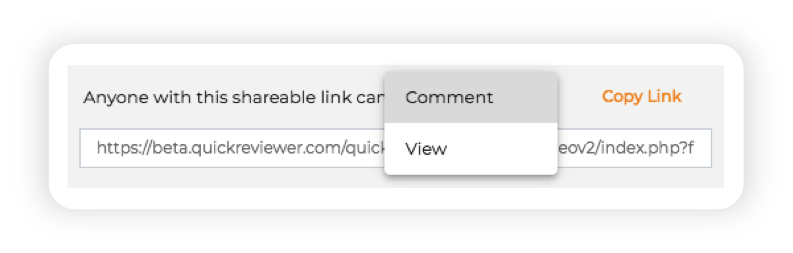
1. Shareable link

QuickReviewer interface showing sharing options with multiple users via email and link

Get a shareable link that you can copy and send to reviewers. Select the Comment or View option depending on the kind of access you wish the link to have. Shareable links allow reviewers to add comments without logging-in to QuickReviewer. In this case, all comments are anonymous.

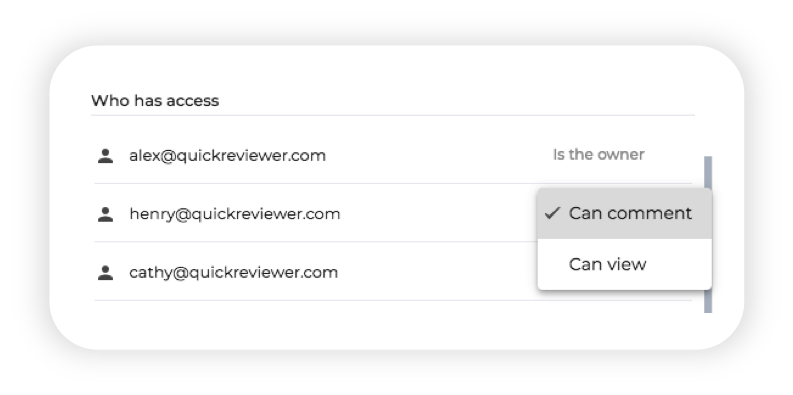
2. Access 

User interface of QuickReviewer showing access control settings, with options to manage permissions and user roles for reviewing and collaboration

This sections shows who all have access to the shared file and the type of access they have. As a file owner you can give users the ability to view or comment on files at any time. Simply click on the drop down to the right of the email IDs to change access rights. Click on the X to remove access of a specific user.


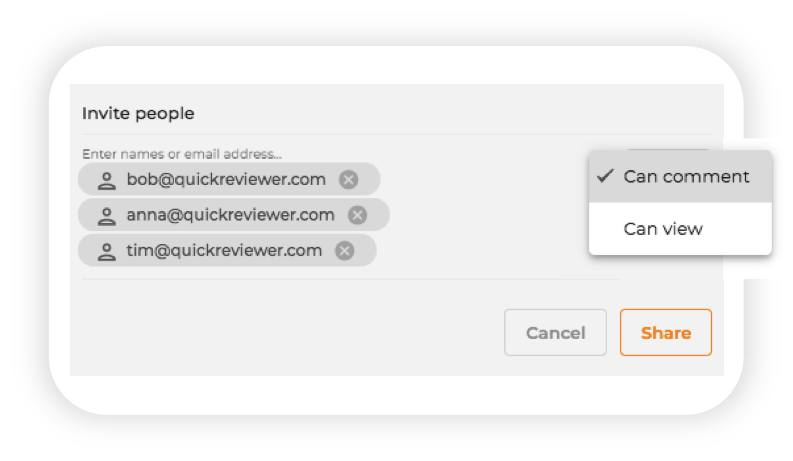
3. Invite users

QuickReviewer interface showing the 'Invite People' pop-up, allowing users to add collaborators via email for reviewing and feedback

Add multiple email IDs and share files with them. A list of reviewers, that you regularly share creatives with, displays in the right bar, allowing you to quickly add their emails by clicking on them. Select an option, so the user Can Comment or Can View. All shared files display in the ‘Shared with me‘ section of their dashboard.


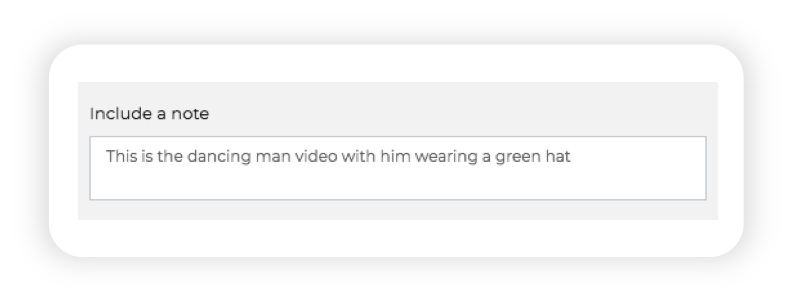
4. Adding a note 


QuickReviewer interface showing a comment box with the option to add a note on a review file
QuickReviewer gives you the option to add a note and send additional information to reviewers. The note added to the email that is sent to everyone for reviewing a file.


5. Disable download

Disable download option in QuickReviewer interface, showing a toggle switch to prevent file downloads

You can Disable Download for all users and restricting them from downloading the assets to their desktops. This is checked by default.


6. Comment without login 

Screenshot of QuickReviewer’s interface showing a comment being added to a document without requiring login, highlighting easy collaboration

Let reviewers Comment without logging in. In which case all comments from the reviewers are anonymous
What are your Feelings

Share This Article :

  • Facebook
  • X
  • LinkedIn
  • Pinterest
Still stuck? How can we help?

How can we help?

Get pixel-perfect clarity
on any creative asset and accelerate your time-to-market.

Get Started
Schedule Demo
  • Free For Life
  • Affordable Upgrades
  • Flexible Add-ons
Logo

QuickReviewer is an advanced online proofing platform engineered to solve the most complex creative review challenges.

Solutions
  • Enterprises
  • Freelancers & Startups
  • Creative Agencies
  • API Solutions
Resources
  • Desktop Uploader
  • Latest Updates
  • Integrations
  • Video Tutorials
  • Blogs
Product
  • Feature Glossary
  • Knowledge Base
  • Partnership Program
  • Pricing
Get in touch
  • Contact Us
©2026 Clavis Technologies. All Rights Reserved.
  • Terms & Conditions
  • Privacy Policy
  • License Agreement
  • Sitemap