
A Technical Deep Dive into Online Proofing (and Why Your PM Tool Isn’t Enough)
In the high-velocity world of brand marketing, “project management” is frequently mistaken for “creative operations.” We obsess over Gantt charts and Kanban boards, assuming that if a task moves to the “In Review” column, the review process itself is efficient.
It rarely is.
While project management (PM) tools excel at tracking status (who is doing what), they are often technically incapable of managing quality (is it right?). This distinction is where Online Proofing exists—not just as a feature, but as a specialized technical layer in the MarTech stack designed to solve the “$958 million marketing problem” of inefficiency.
This post technically deconstructs online proofing software, explores why it will be the target of the “Great SaaS Consolidation of 2026,” and highlights the financial benefits of agile tools like QuickReviewer.
What is Online Proofing? (The Technical Architecture)
At its core, online proofing is a cloud-based framework designed to streamline the approval of creative assets. However, calling it “file sharing” is a technical misnomer.
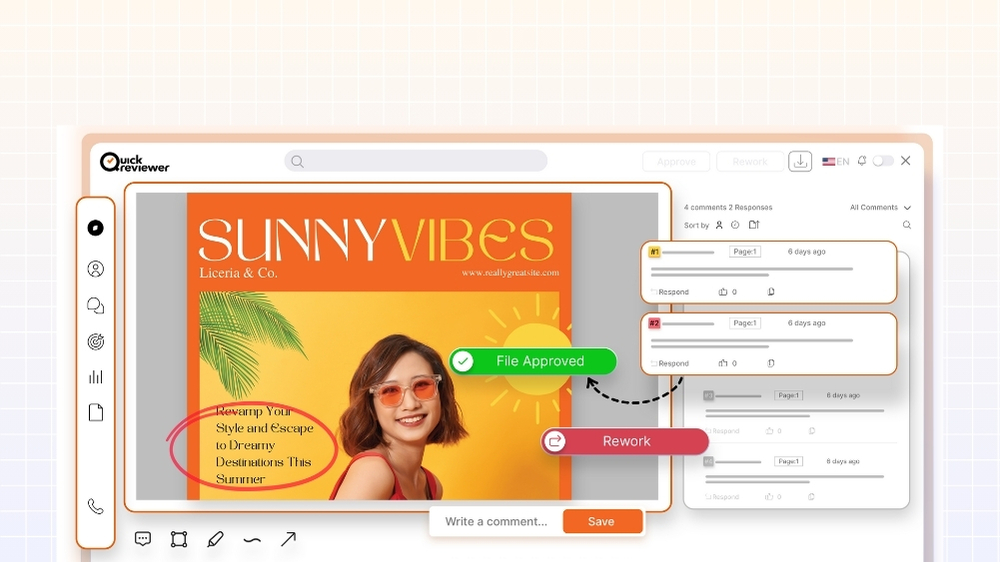
A robust online proofing system functions as a layered visual database. When a creative asset (image, video, or URL) is uploaded, the software renders it into a browser-compatible format (often using HTML5) and superimposes a vector-based annotation layer (typically an HTML5 Canvas element) on top of it.
- Coordinate-Based Feedback: When a stakeholder draws a red circle on a typo, the system records the exact X/Y coordinates relative to the asset’s resolution.
- Temporal Metadata: For video, the system records the X/Y coordinates plus the specific timecode (down to the millisecond).
- Cryptographic Version Hashing: The system uses hashing to ensure Version 1 and Version 2 are distinct, immutable objects. This allows for pixel-perfect overlay comparisons (e.g., “Difference Mode,” which highlights changed pixels in neon to instantly reveal edits).
This architecture transforms “feedback” from a subjective email thread into structured, actionable data.
The Taxonomy of Proofing: Beyond the JPEG
Creative Directors often assume proofing is limited to static images. Modern proofing engines, however, utilize distinct rendering technologies for complex asset classes.
Static Proofing (The Standard)
- The Mechanism: The system converts heavy print-ready files (like 500MB CMYK PDFs) into web-optimized RGB tiles. This allows a reviewer to zoom in 800% on a billboard design in a standard browser without downloading the source file, preserving color accuracy and font rendering.
Video & Audio Proofing (The Temporal)
- The Mechanism: Unlike a standard video player, a proofing player buffers frame-by-frame. Comments are anchored to the timeline, allowing the player to “seek” to the exact frame when a comment is clicked.
- The “Hidden” Efficiency: Agile tools like QuickReviewer have optimized this further by allowing external stakeholders (clients or legal teams) to leave timestamped feedback without creating an account. This removes the “login fatigue” that often causes clients to revert to email feedback.
Web & HTML5 Proofing (The Interactive)
- The Mechanism: You cannot simply “upload” a live website. Proofing tools use a proxy server to load the live URL inside a secure container (iframe). This bypasses “mixed content” security warnings and allows the proofing tool to inject its own JavaScript overlay on top of the live site.
- Mobile Responsiveness: A unique advantage of agile platforms like QuickReviewer is the ability to audit responsive designs. It allows reviewers to toggle between 30+ device viewports (e.g., iPhone 15 vs. iPad Pro) within the proofing window, letting you annotate a “broken” menu on mobile that looks fine on desktop.
The “Negligence Tax”: Why PM Tools Fail at Proofing
Many Brand Marketers and Creative Directors default to managing reviews inside tools like Asana, Trello, or Monday.com. The logic is understandable: “We already pay for it, why not use it?”
However, relying on PM tools for creative quality assurance introduces significant risks.
The Security & Compliance Gap
PM tools treat assets as generic attachments. In contrast, specialized proofing tools are built for asset security.
- SOC2 & Watermarking: Specialized tools automatically watermark pre-release assets and restrict downloads based on user roles.
- The “Audit Trail” Requirement: In regulated industries, every approval must be traceable. Proofing tools log every view, comment, and decision with a timestamped digital signature. Generic PM tools often allow users to edit or delete comments, breaking the chain of custody.
The “Version Control” Fallacy
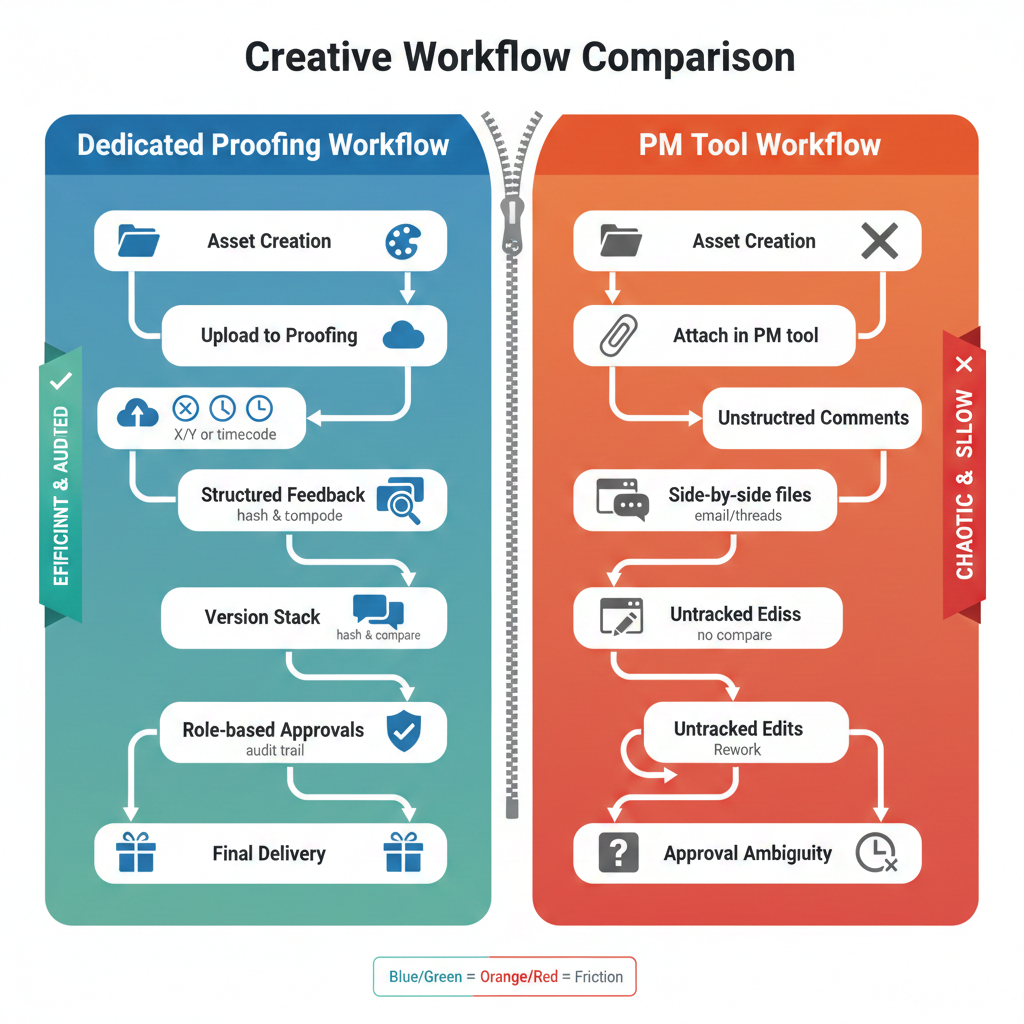
PM tools rarely stack versions automatically. V1 and V2 often sit side-by-side as separate attachments.
- The Consequence: It becomes impossible to perform a “Compare Mode” analysis. Creative Directors cannot easily verify if the requested changes were actually made, leading to manual reviews that waste hours.
- The Specialized Fix: Dedicated solutions solve this by “stacking” versions. QuickReviewer, for instance, offers a side-by-side comparison mode that locks timelines for videos and PDFs, ensuring that scrolling on V1 synchronously scrolls V2, making spotting differences effortless.
Common Question: “Why not just use Google Drive comments?”
It’s a fair question, but technically flawed. Google Drive is a storage engine, not a rendering engine.
- Frame Accuracy: Drive previews often “float” comments near a timestamp, but lack SMPTE-level frame accuracy. This leads to editors cutting the wrong frame.
- Color fidelity: Drive compresses previews, often shifting CMYK print files to dull RGB, causing false rejections on color-critical work. Specialized tools render the raw file faithfully.
The 2026 Mandate: Surviving the SaaS Consolidation
As we look toward 2026, the era of “growth at all costs” is over. CFOs are now mandating SaaS Consolidation—cutting bloated software stacks to save costs.
This presents a paradox: How do you consolidate tools without losing capability?
The “False Economy” of All-in-One Tools
The temptation is to cut dedicated proofing tools and rely on the free add-ons inside PM software. This is a false economy. If a free tool causes a 2-day delay in a campaign launch due to unclear feedback, the “cost of delay” far exceeds the software license.
The Strategic Replacement Strategy
Smart consolidation isn’t about removing proofing; it’s about right-sizing it.
- The “Seat Tax” Problem: Legacy enterprise proofing tools (like Ziflow or ProofHQ) often charge per user. If you have 50 clients who need to review work, you might pay for 50 “guest seats.” This is a tax on your agency’s growth.
- The QuickReviewer Solution: This is where QuickReviewer disrupts the model. With unlimited reviewers on many plans, it eliminates the “guest tax.” You can invite 500 clients to review work without paying a cent more.
- Financial Impact: By switching from a per-seat legacy tool to a flat-rate agile tool, agencies often see a 40-60% reduction in software licensing costs while actually increasing the number of stakeholders involved.
Operational Savings: The Hidden ROI
Beyond the license fee, there is the operational cost of friction.
- Login Fatigue: Requiring a client to create a login for your PM tool just to approve a video adds friction. QuickReviewer’s “link-based” review system removes this barrier, speeding up approval times by an average of 28%.
- Mobile-First Workflows: As Creative Directors approve work from airports and taxis, the ability to access a full proofing suite via mobile—without a degraded experience—has become a silent productivity multiplier.
Conclusion
For Creative Directors and Marketers, recognizing the distinction between Project Management (When is it due?) and Online Proofing (Is it right?) is critical.
Adopting dedicated proofing technology is not about adding “another tool” to the stack; it is about closing the most expensive gap in the creative lifecycle. Whether you choose a heavy enterprise suite or an agile, cost-efficient tool like QuickReviewer, the goal remains the same: stop managing chaos and start engineering quality.
